
Your
question paperPDF test setguide bookold notes
is already a test.
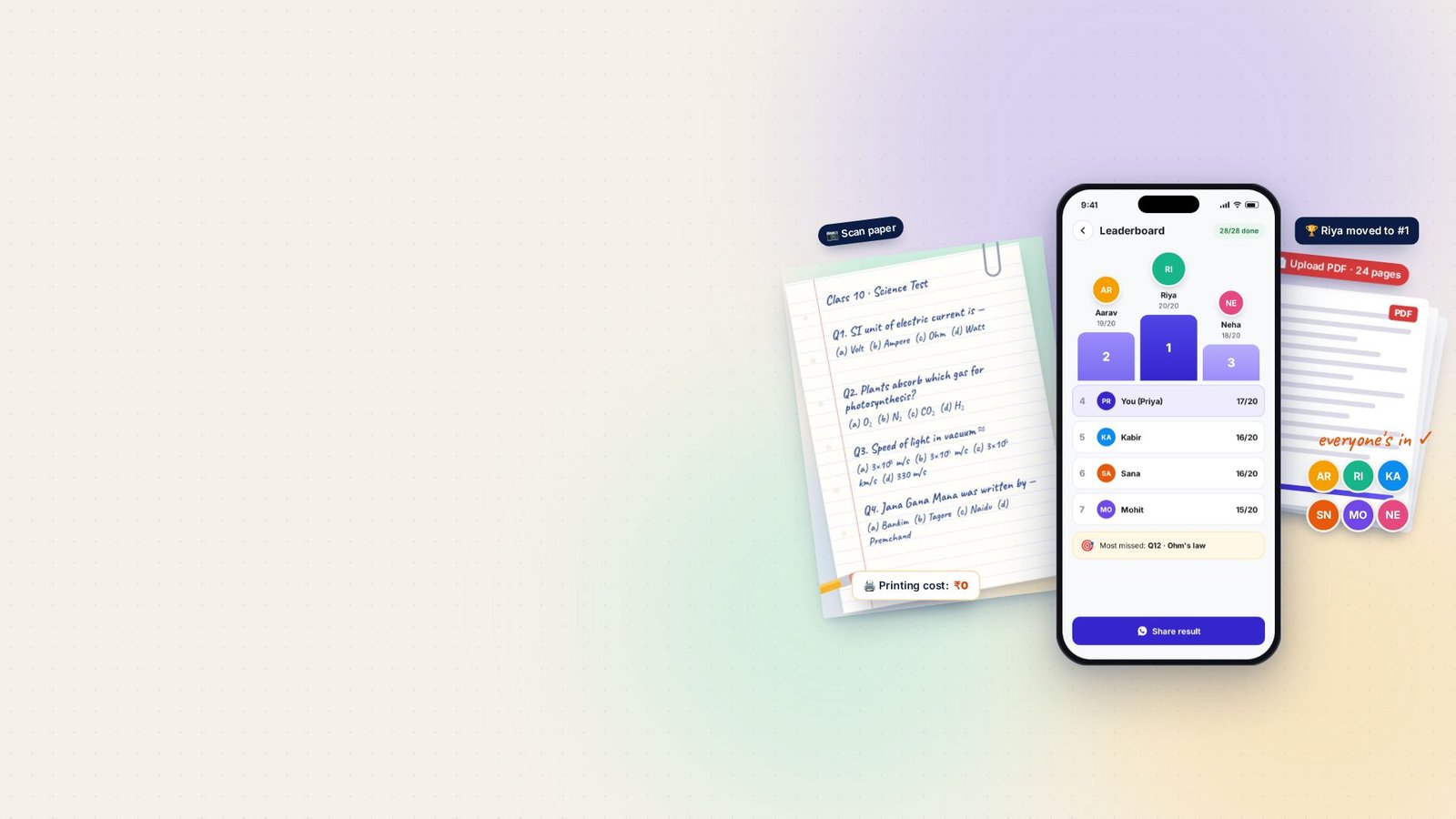
Scan any handwritten paper or upload a PDF. Testlook turns it into MCQs you can practise solo — or run live for a whole class, library or study group, with a real-time leaderboard.
- Scan or upload PDF
- Solo or whole class
- ₹0 printing
Good questions are everywhere. Turning them into a test costs time and paper.
- 01Photocopy the paper for every student₹ every test
- 02Type every question into a blank formevery question
- 03Share a long link — “link nahi khul raha”link trouble
- 04Check, total and rank the answers by handhours later
Testlook replaces all four with one scan — or one PDF.
Four steps from paper to leaderboard.
Hover or tap Explore on any step to see what happens inside the app.
-
 step 01
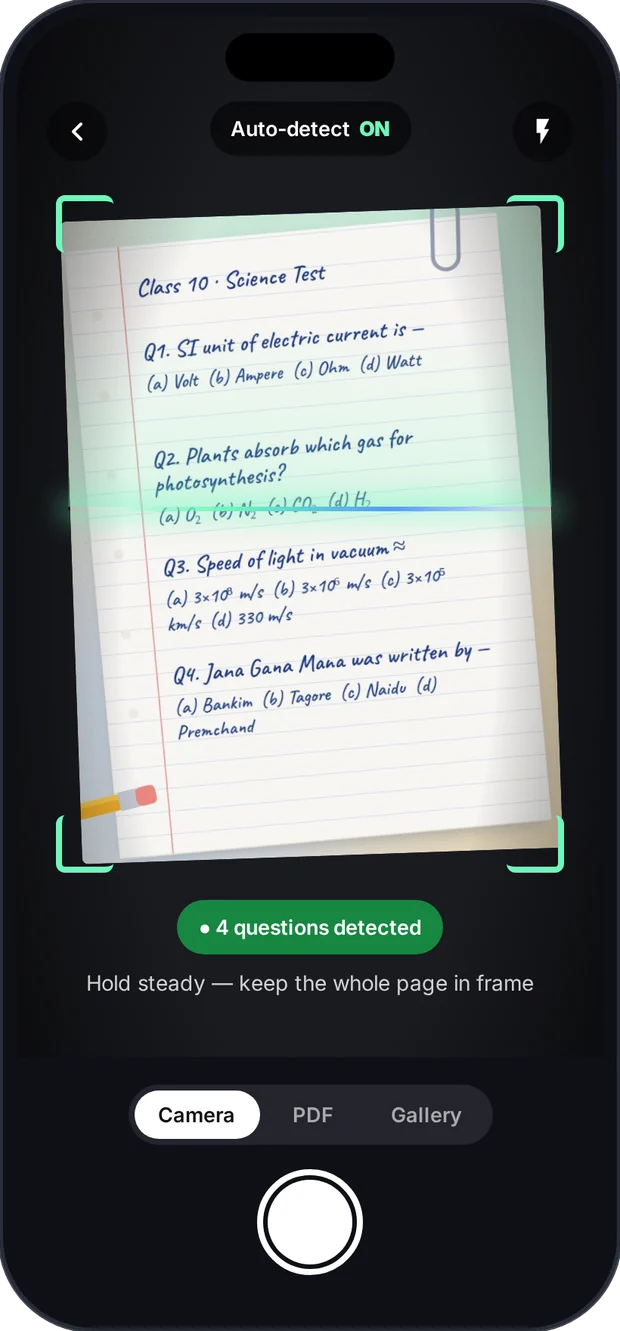
Scan a paper or upload a PDF
Photograph a handwritten or printed paper — or upload the PDF test set you already have.
Step 01 · Capture

Start with what you already have — paper or PDF.
No blank forms, no copy-paste. Point the camera at a notebook page, a printout or a guide book — or pick a PDF test set from your phone. Testlook reads every page.
- Handwritten and printed pages
- PDF test sets and question banks
- Answer keys detected when present
-
 step 02
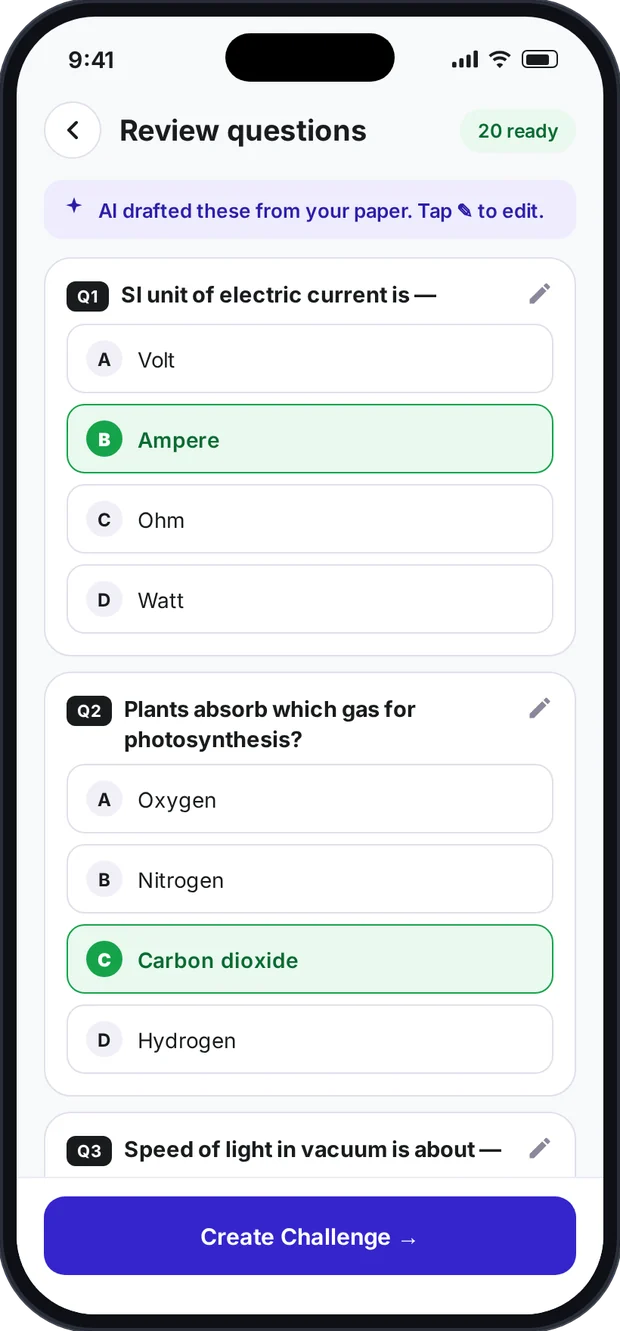
AI drafts the MCQs
Questions, options and answers are laid out in a clean MCQ format for you to check.
Step 02 · ConvertAI does the typing. You stay in charge.
Every question and option lands in one consistent format. Fix anything the AI misread, confirm the right answers, and it's ready.
- Questions and 4 options structured automatically
- Edit any question before going live
- Nothing publishes without your approval
-
 step 03
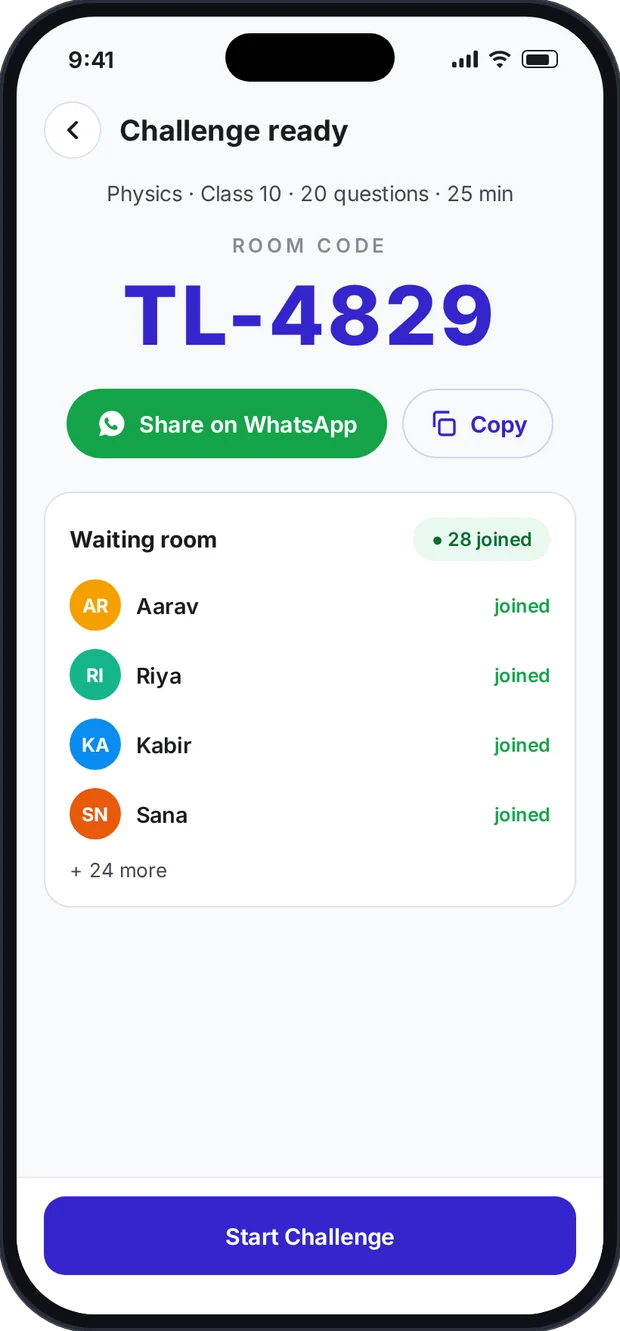
Share a code — or practise solo
Get a room code for your class, batch or group. Or keep it to yourself and practise.
Step 03 · ShareOne short code gets everyone in.
Send the room code to your WhatsApp group and everyone joins from their phones at the same time. Studying alone? Start a solo practice instead.
- Room code for every challenge
- WhatsApp-first sharing
- Solo practice for self-assessment
-
 step 04
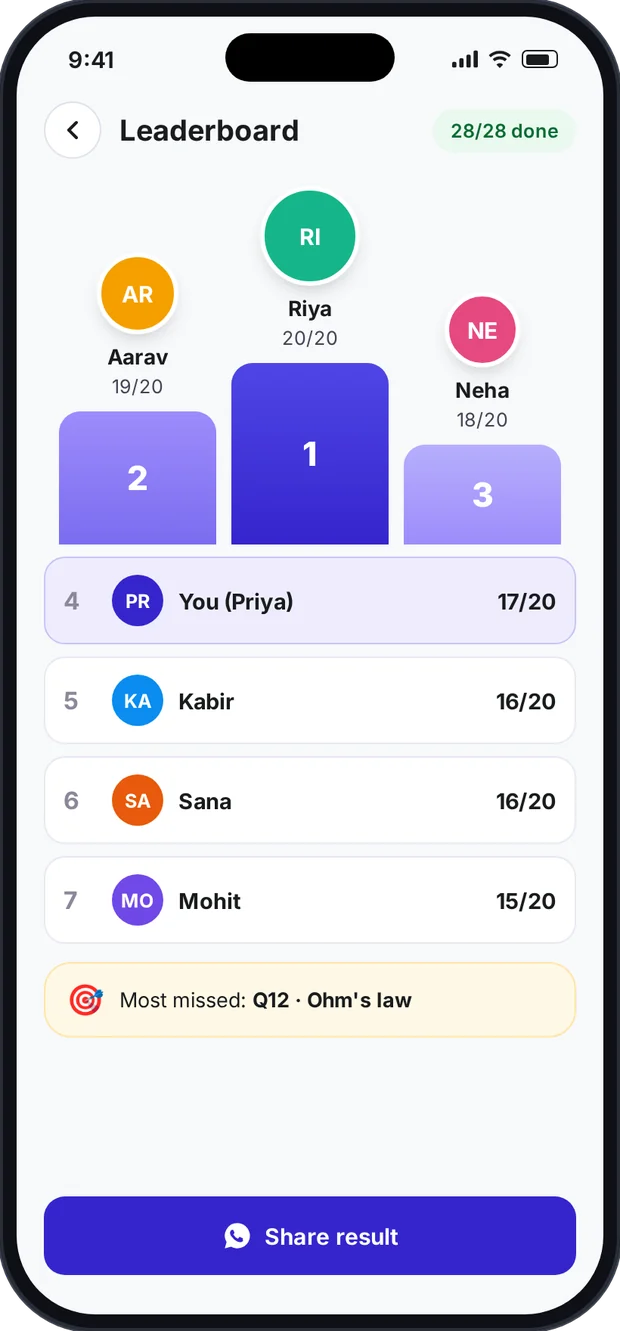
Live leaderboard & results
Everyone attempts together. Ranks move live and results arrive instantly.
Step 04 · ResultsFrom “test over” to “who topped?” in seconds.
Answers are scored automatically. Watch the leaderboard move while the test runs, then see scores, ranks and the questions most people missed.
- Real-time leaderboard
- Instant scoring — no manual checking
- Most-missed questions and topics
Don't take our word for it. Try it right here.
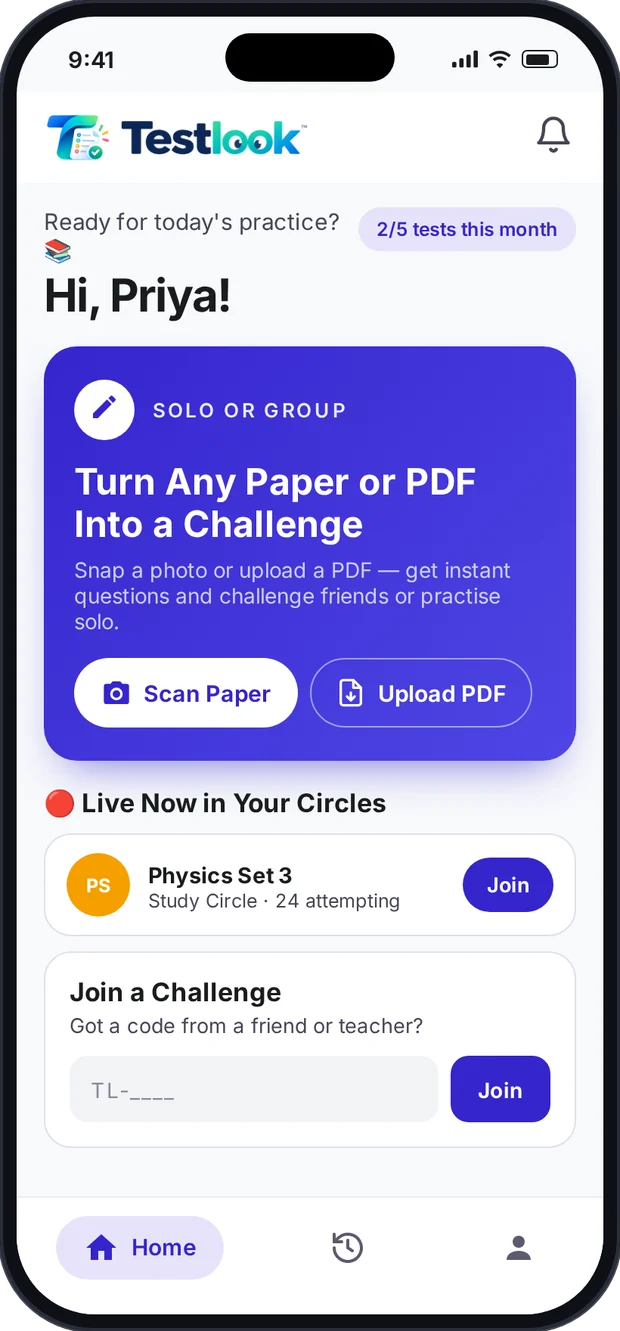
Scan a handwritten paper or upload a PDF, then run it as a live challenge or a solo practice. No signup, nothing is saved.
- 1Scan
- 2Convert
- 3Share / Solo
- 4Results
Unit test — Science & GK
- Q1. SI unit of electric current?(a) volt (b) ampere (c) ohm (d) watt
- Q2. Plants absorb which gas?(a) O₂ (b) N₂ (c) CO₂ (d) H₂
- Q3. Jana Gana Mana was written by —(a) Bankim (b) Tagore (c) Naidu (d) Premchand
A simulation for the website. The real app works on your own papers and PDFs.
● DemoYour test will appear here ✎
Save paper. Test everyone at once. Watch ranks move live.
A class of 40, a library of 200 or a study group of 5 — everyone attempts together on their own phone, and nobody waits for results.
- ₹0 printingNo photocopies of question papers or answer sheets.
- All at onceEveryone joins with one code and attempts in real time.
- Live ranksThe leaderboard updates as answers come in.
🖨️ How much will you save on paper?
An estimate from your numbers — question paper + answer sheet printing only. Change the sliders to match your class, batch or library.
- 1RIRiya▲14
- 2ARAarav▲13
- 3PRPriya▲12
- 4KAKabir▲12
- 5SNSana▲11
- 6MOMohit▲10
28 attempting right now · demo
Everything a test needs. Nothing it doesn't.
 paper ho ya PDF ✓
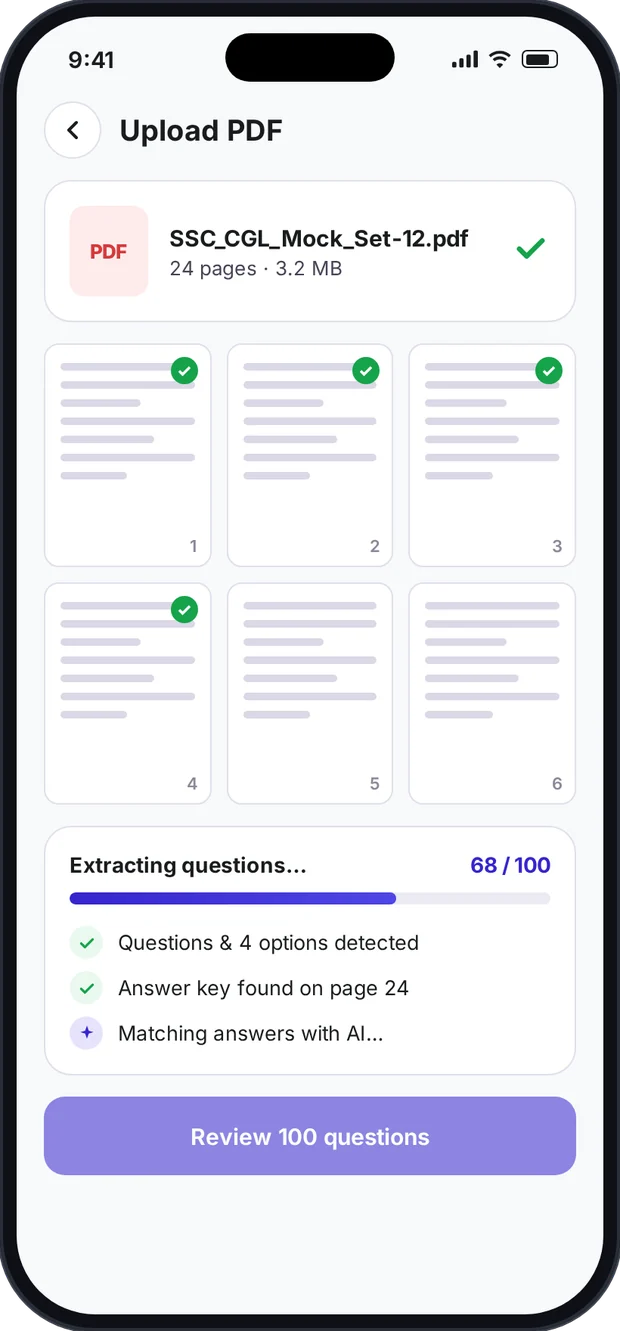
Paper or PDF — both become a test.
Scan notebook pages, printed sheets and guide books — or upload the PDF test sets and question banks already on your phone.
- Handwritten and printed pages
- Multi-page PDF test sets
- Answer keys detected when present
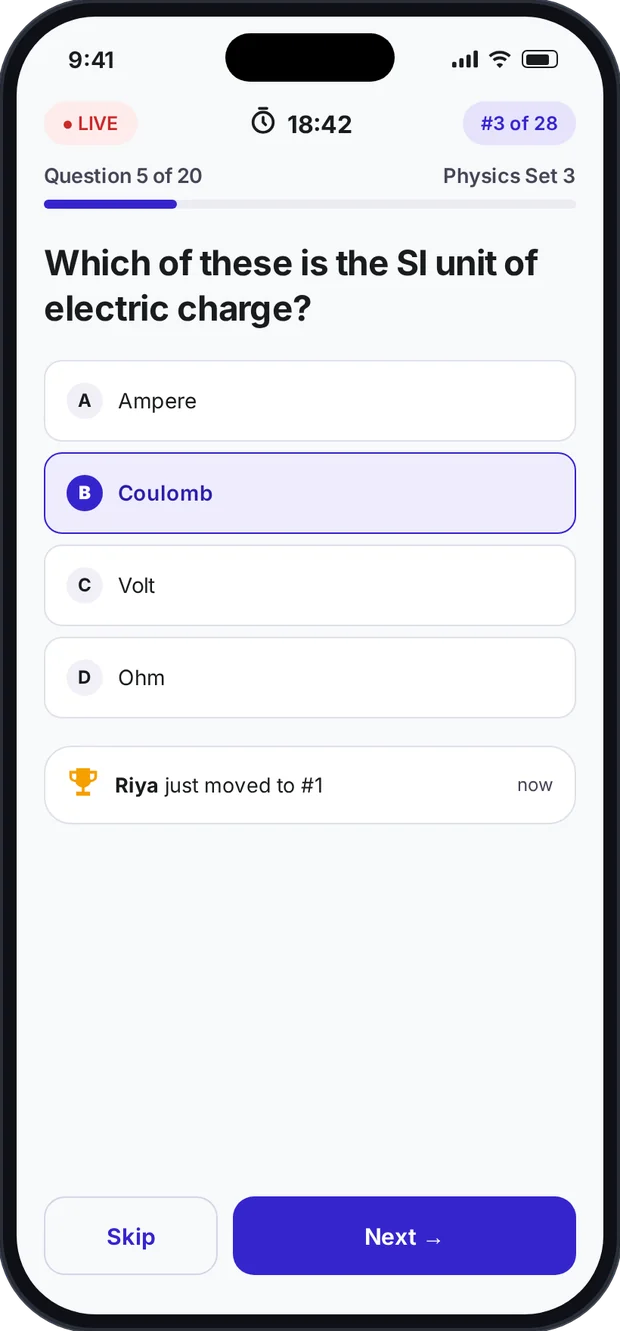
Everyone attempts together. Ranks move live.
Share one code and the whole class, batch, library or group joins from their phones. The leaderboard moves as answers come in.
- Live test with timer and live rank
- Real-time leaderboard
- Most-missed questions after the test
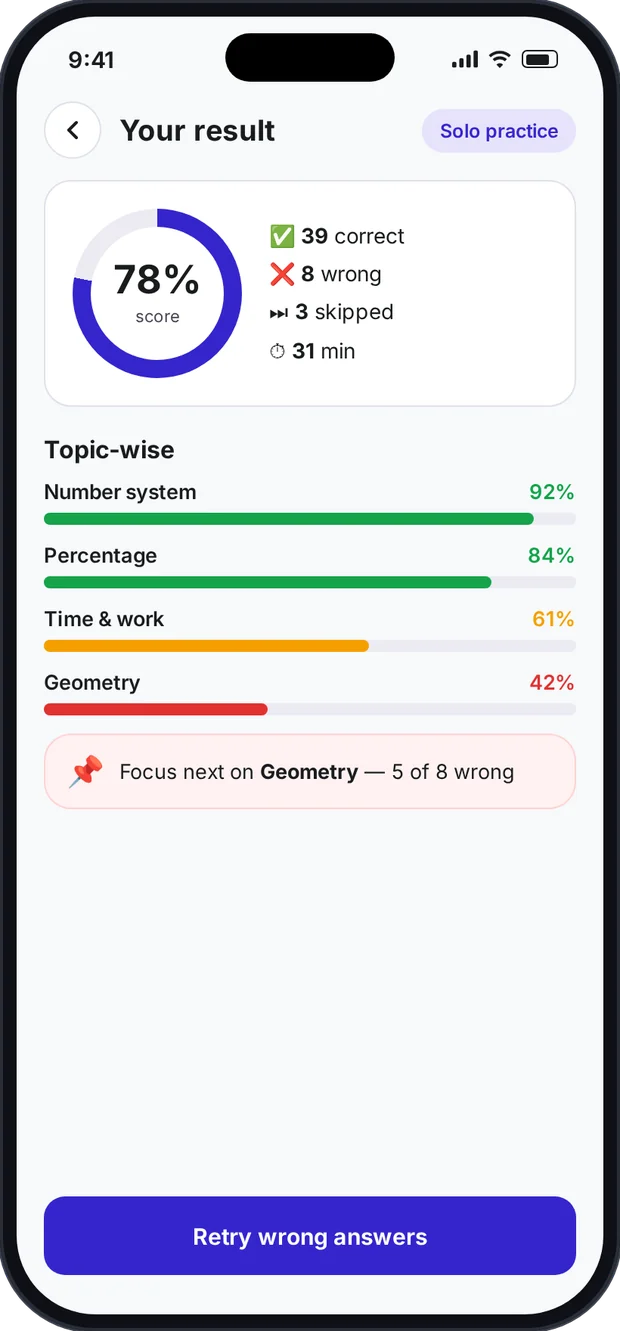 self-assessment ✓
Studying alone? Practise solo.
No class needed. Students and aspirants can turn any paper or PDF into a personal practice test and see exactly where they stand.
- Score, accuracy and time
- Topic-wise strengths and weak areas
- Retry only the questions you got wrong
Scan any paper
Handwritten or printed — notebook, guide book or printout.
Upload any PDF
Mock sets, question banks and old papers become live tests.
Review before publish
AI drafts the MCQs; you edit and approve.
Solo or group
Practise alone, or challenge a whole class, batch or Circle.
Room code + WhatsApp
One short code gets everyone in at the same time.
Live leaderboard
Ranks move in real time; results arrive instantly.
One app. Ten kinds of people who take tests.
From a Class 8 student practising alone to a library running contests for 200 members — the flow is the same.
Turn your guide book into a practice test.
Class 6–12 students can scan sample papers or chapter questions and practise solo — then see exactly which topics need work before the exam.
- Self-assessment from any book, notes or sample paper
- Topic-wise score after every attempt
- Challenge classmates with a room code
Your PDF mock sets, as real timed tests.
SSC, Railway, Banking, BPSC, Police, TET… aspirants already have folders of PDF test sets. Upload one and attempt it like a real CBT, with timer and score.
- Upload PDF sets from Telegram or websites
- Timed attempts that feel like the real exam
- Compete with your prep group on a live leaderboard
Semester MCQs and placement prep, sorted.
Convert class notes, question banks and aptitude sheets into quick tests — for semester exams, placement aptitude rounds or GATE practice.
- Notes and question banks become MCQ tests
- Group practice before exams
- Aptitude drills with instant scores
Group study with a scoreboard.
One member uploads the paper, everyone joins with a code and attempts together. Circles keep your group's live tests in one place.
- Everyone attempts at the same time
- Live leaderboard makes it competitive
- Circles for your regular group
Weekly contests that keep members coming back.
Self-study libraries and reading rooms can run weekly mock contests for members — no printing, no checking, and a leaderboard everyone talks about.
- Weekly mock tests for all members at once
- Zero printing cost per contest
- A leaderboard that builds loyalty
Class tests without the typing or the checking.
Scan the unit test you already wrote, share the code in the class group and get marks and ranks before the period ends.
- Reuse papers from notebooks and past years
- Quick revision quizzes in class
- Marks and rankings without a red pen
Daily practice for every batch.
Printed question banks become batch-wise practice rounds. Faculty explain; Testlook does the typing, checking and ranking.
- Batch-wise tests from existing material
- Leaderboards that push competitive batches
- No photocopy bills for daily practice
An easy assessment habit across sections.
Weekly revision tests for every section — on the phones teachers and students already use. No new hardware, no training sessions.
- Same simple flow for every teacher
- Weekly checks across classes and subjects
- Cuts printing for class tests
Turn your question bank into live contests.
Educators on YouTube and Telegram, and publishers of question banks, can convert their material into live tests and run contests for their audience.
- Question banks and books become live tests
- Live contests for followers with one code
- Leaderboards that drive engagement
Home practice, without printing a thing.
Scan a page from your child's book and turn it into a quick quiz. See the score and which topics need a little more help.
- Quick quizzes from any school book
- See weak topics at a glance
- Make practice feel like a game
Built next — mostly for students.
Students don't just need a score. They need to know why they got it wrong and what to practise next. That's where we're heading.
- Now: core app in final testing
- Next: early-access pilot
- Then: Google Play & App Store launch
- Coming soon
AI explanation for every answer
See why an answer is right — and why yours wasn't — in simple language.
For: Students · Aspirants
- Coming soon
Mistake notebook & smart re-tests
Every wrong answer is saved and comes back for revision until you get it right.
For: Students · Aspirants
- Coming soon
Real exam mode (CBT)
Sections, negative marking and a real exam-style interface for competitive exams.
For: Aspirants
- Coming soon
Hindi & bilingual questions
Attempt in Hindi, English or both — built for Hindi-medium learners.
For: Everyone
- Coming soon
Progress & weak-topic tracker
Track scores over weeks and see which topics are improving.
For: Students · Parents
- Coming soon
Daily challenge & streaks
A short daily test that builds a habit — with streaks to keep you going.
For: Students
- Coming soon
1-vs-1 battles
Challenge a friend to a quick head-to-head round on any topic.
For: Students · Groups
- Coming soon
Open contests & state ranks
Join public contests and see where you stand against students across India.
For: Aspirants · Creators
Other tools start with a blank form. We start with your paper.
That removes the biggest reason people give up on digital tests: rebuilding everything by hand — and printing it again and again.
The usual way
- Print a copy for every student
- Type every question and option
- Long links and “link not opening”
- Check and rank answers by hand
- One teacher, one class, one paper
- Scan a paper or upload a PDF
- AI drafts the MCQs — you approve them
- One room code, shared on WhatsApp
- Live leaderboard, instant results
- Solo practice, groups, classes, libraries
Three founders. One very specific problem.
Business, technology and operations — what it takes to put a new habit in thousands of classrooms, libraries and study groups.
-
business & growth
Alok Kumar
Founder & CEO
-
builds the product
Vivek
Co-founder & CTO
-
keeps it running
Saurabh Kumar Singh
Co-founder & Operations
Yes. Scan a paper or upload a PDF and choose solo practice. You'll get your score and a topic-wise breakdown after every attempt.
That's exactly what PDF upload is for. Upload the PDF, review the questions Testlook finds, and attempt it as a timed test. Clear, text-based PDFs work best.
Yes. Create a challenge, share the room code in your group and attempt together — the leaderboard updates live.
Yes. Clear, well-lit photos work best, and you can edit anything the AI misreads before the test goes live.
You should, and it's quick. Every question and option is shown for review; nothing is published until you approve it.
Share a short room code — usually in your class or batch WhatsApp group — and students join the live test on their phones.
Yes. Upload the week's mock test, share one code with members and everyone attempts at the same time with a live leaderboard.
Circles are groups inside the app — your study group, batch or library members — so live tests show up for everyone in the group.
No. Anyone with the code can join from their own phone, wherever they are.
Not publicly. Testlook is in its final pre-launch stage. Join early access to use it before the Google Play and App Store release.
Multiple-choice questions, which can be scored automatically and ranked on the leaderboard.
They're used to create your tests. Read the privacy policy for how data is handled.
Stop retyping.
Start testing.
Join the early-access list — students, teachers, libraries and study groups welcome. You'll get Testlook before the public launch and a direct line to the team building it.
Know someone who'd love this? Share it on WhatsApp